 Trawler
Audio
The Audio tab holds two different ways of matching music, chosen from one dropdown. One reads the tags. One listens to the recording. Picking the wrong one is the usual reason a music search comes back empty, so start here.
Run a scan first — the match reads the scan results rather than searching your drives.
Tick a track's checkbox to Discard, or untick it to Keep. The shield beside it identifies a protected location. You can still explicitly discard that track. Use the play button beside the row to listen before deciding.
Which one do you want?
If your files are well tagged, match by tags. If they are not, match by sound. That is the whole decision.
| Your library | Choose | Why |
|---|---|---|
| Bought or ripped, with proper artist/title tags | Exact, Similar or Approximate | Quick — Trawler reads only the tags, never the audio |
| Downloaded, untagged, or tagged inconsistently | By sound | The only choice that works when the tags are missing or wrong |
| The same recording at different bitrates | By sound | The tags may not agree; the audio does |
| The same song across different albums | A tag mode | Two different recordings will not sound alike |
The dropdown starts on By sound.
The four choices
| Choice | On screen | What it compares |
|---|---|---|
| By sound | "Listens to the audio" | The recording itself. Ignores tags completely. |
| Exact | "Exact match" | Artist and title must agree, after tidying. |
| Similar | "Allows typos" | Same, but tolerates spelling differences. |
| Approximate | "Allows remixes & reordering" | Same, more loosely still — catches reordered and decorated titles. |
Telling the results apart
Each group carries a badge saying how it was found:
- Audio · tags — matched on tags.
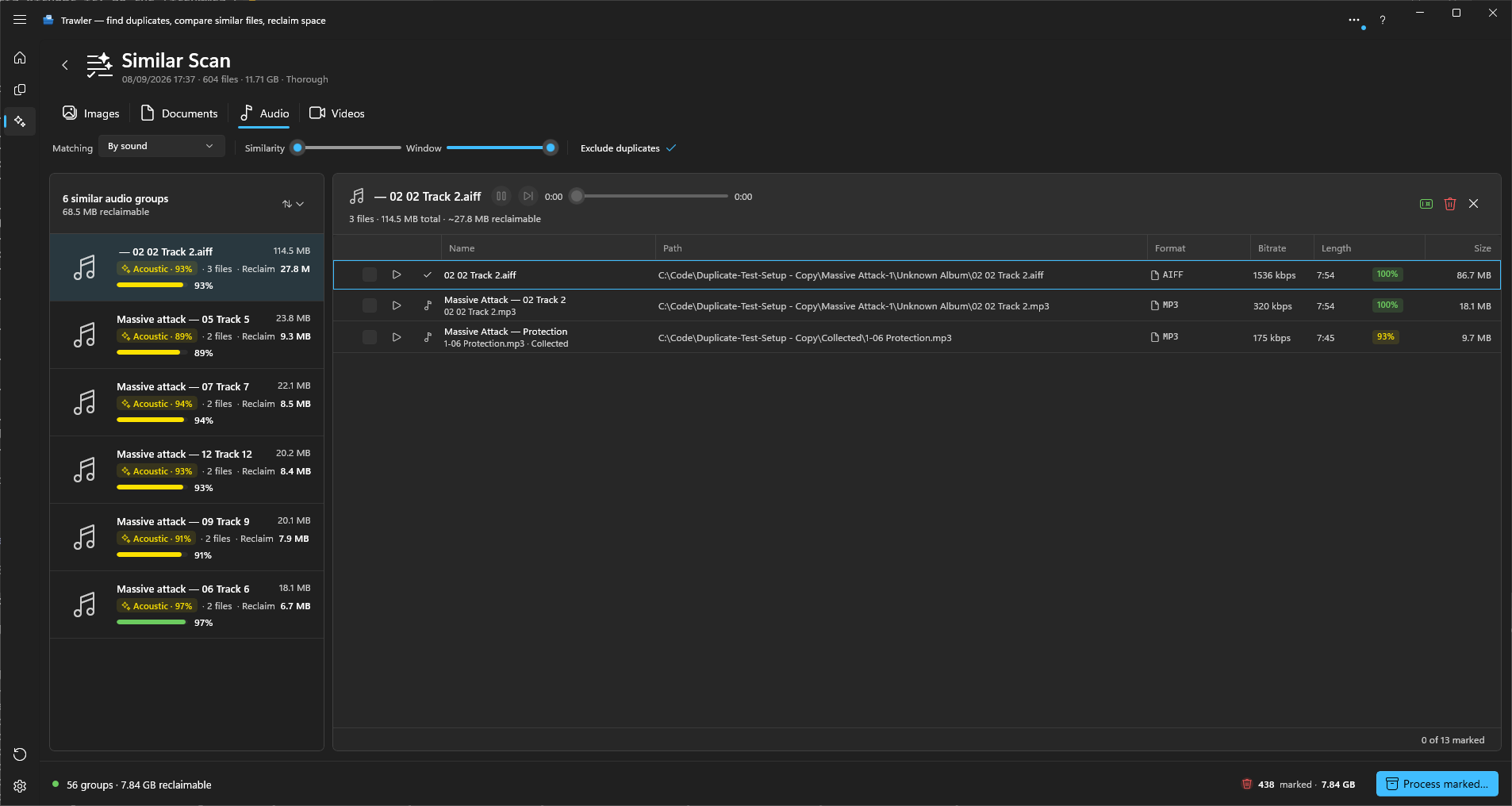
- Acoustic · N% — matched on sound. The percentage is the weakest pairing in the group, so a group reading 88% has no member below that.
Matching by tags
Trawler reads each file's artist, title, album and length — it never opens the audio, so this is fast even on a large library.
A file with no artist, no title, or no readable length is never grouped this way. Untagged rips simply do not appear. That is the case for By sound.
"Exact" is not literally exact. Before comparing, Trawler tidies every tag: it ignores case, accents, curly quotes, punctuation, a leading The / A / An, anything from feat. onwards, and a trailing bracketed note such as (Remastered), [Explicit], (Radio Edit) or (Deluxe). So "The Beatles" and "Beatles" group, and so do "Hey Jude" and "Hey Jude (2009 Remaster)".
Controls:
| Control | Range | Starts at | What it does |
|---|---|---|---|
| Threshold | 50–100% | 75% | How closely titles and artists must agree. Only active for Similar and Approximate — Exact ignores it. |
| Duration ± | 0–30 s | 2 s | How far two tracks' lengths may differ and still group. |
| Include album | on / off | off | "Include the album tag in the match too (stricter)." Turn it on to stop an album track grouping with its best of copy. |
Changing any of these re-runs the match immediately — it costs almost nothing.
Matching by sound
By sound decodes part of each track and compares the audio. It finds the same recording across different formats and bitrates, and it works on files with no tags at all.
It is much slower than tag matching, because every file has to be read. The first run is the expensive one, and it never starts on its own: switching the dropdown to By sound clears the list, and you start the run with Find similar audio.
Switching to one of the three tag modes fills the list straight away when the work has already been done — a scan that included audio does both kinds of matching, so both are usually ready and waiting. When it has not been done, the tag match simply runs, because that costs almost nothing.
| Control | Range | Starts at | What it does |
|---|---|---|---|
| Similarity | 50–100% | 85% | How alike two tracks must sound to group. |
| Window | 5–60 s | 15 s | How much of each track is listened to. Longer is more reliable on tracks that share an intro. |
Hover either slider to read its current setting; while you drag, the figure follows the handle.
Moving Similarity re-groups what has already been read. Moving Window does not: a different window means every track has to be read again, so Trawler shows "Settings changed since the last audio match." with Re-run and Revert. Revert puts the setting back and keeps your current results.
The file types each method covers
They are not quite the same list.
| By tags | By sound | |
|---|---|---|
.mp3 .flac .m4a .ogg .aac .aiff |
Yes | Yes |
.wav |
No | Yes |
.wma is played and counted, but neither method can match it.
Nothing is picked for you
"Matches are advisory — tracks may differ in content or quality. Mark each file you want to remove; nothing is selected for you."
Each member row shows its format, bitrate, length and size so you can judge which copy to keep. Replace with hardlink is not offered on Similar results.
For more than that, the Details panel shows the first four tracks of the selected group: one column per track, with rows such as Title, Artist, Album, Duration, Bit rate, Sample rate, Bit depth and Genre. Rows where the tracks differ are in bold. Show or hide it with Explore → Details in the ribbon. Trawler reads the tracks only while it is open.
Volume and mute
There is one volume and one mute for the whole app, so you set it once. The speaker button and volume slider sit in every player: the Similar audio player, the Files tiles and a playing Videos tile (button only), the comparison strips, and full screen for audio and video. Change it in one place and every player follows at once.
- Select the speaker button to mute. Select it again to unmute; the volume returns to where it was.
- Drag the slider while muted and sound comes back at the level you drag to.
- Unmuting from a volume of zero returns to half volume.
- The setting is remembered between sessions. Reset in General settings sets it back to full volume, unmuted.
Listening and comparing A / B
Use the group's player to listen, move back five seconds, or switch to the next track at the same playback position. Drag Playback position, or focus it and use the arrow keys, to seek. The compact player shows elapsed and total time. At its right end are a speaker button and a volume slider; see Volume and mute below.
Choose Compare to open the comparison. A track that was playing in the list carries on playing there from the same point; going back to the list stops it. The strip at the bottom shows the group's tracks, each with its album art (a music note if there is none), with A and B badges on the two being compared. Select another track to put it in B. Select A's tile to swap the pair. The same file cannot occupy both panes.
Choose Switch A/B, between the two tracks, to switch what you hear at the current position. The outlined track is the listening source. Only one file plays at a time. Use Keep or Discard beside each track's name to review that file. Discard marks it for Process marked; it does not delete it immediately. The previous/next arrows move between tracks or groups, as on image compare. Auto-advance moves on after a decision when enabled.
Turn on Auto-play the next group, in the Similar ribbon, and each new group starts playing from the beginning when you move to it — after your last decision in a group, or with the previous/next group arrows. It is off to start with, and Trawler remembers your choice.
In compare, the Details panel shows A and B. Back in the list, it shows the first four tracks.
The two waveforms share a time and amplitude scale. Original source levels shows each file's own channels and sample levels, even when you change the listening volume.
| Control | What it does |
|---|---|
| Back five seconds / Forward five seconds | The buttons either side of play, and J and L. They move both tracks 5 seconds. |
| The volume slider and speaker button | Change how loud playback is, and mute it. See Volume and mute below. |
| Drag across a waveform | Selects a passage to repeat in both files. Drag either edge to adjust it. Clear loop, the × at the passage's top right corner, clears it; so does clicking the waveform outside the passage, which also moves playback there. |
| Align B by dragging its waveform | The button at the top right of B. While it is on, drag B's waveform sideways to line it up with A. Reset alignment appears beside it when the timing has changed. |
Loudness is shown in LUFS; Sample peak and channel readings use dBFS. A silent channel reads −∞ dBFS. An unavailable reading shows —, not a zero level. A red dot beside a channel marks samples at the format limit, known as full scale. It does not prove audible distortion or rank one recording above another. The held full-scale indicators clear when a track ends or is replaced. At the end, its meter returns to silence rather than showing an unavailable reading.
While measurements load, you see "Reading audio levels…". If they cannot be read, you see "Audio levels unavailable. Playback may still be available." Playback and measurements can be available independently.
Listening adjustments do not change your files or mark anything for removal. Choose Back to return to the list with your review decisions retained.
Ribbon controls
Choose Matching settings to change the matching options or toggle Exclude duplicates. Open Similarity for the sliders. These settings are hidden while you review or compare files.
In a comparison, the Similar ribbon shows the controls for that type of file. Navigation moves between members or groups. Back returns to the group view; Details opens the information panel. Keep, discard and the tools for individual files remain beside the files.
Related
- What "similar" means — how Similar differs from Duplicates
- Reviewing similar results — working through a list of groups
- The Details panel — compare tracks' tags and encoding side by side
- Images — the same idea for pictures
- Processing — what happens to the tracks you tick